
If you are living off-grid, boondocking in an RV, or sailing on a boat, your battery bank is your lifeline. Running out of power in the middle of the night means no lights, a warm refrigerator, and a dead water pump.
To prevent this, you need to know exactly how much power you have left. Unfortunately, the cheap voltage meters that come pre-installed in most RVs are notoriously inaccurate, especially with modern lithium batteries. To get true, accurate data, you need a Battery Monitor with a Shunt.
In this guide, we will explain why a shunt is absolutely necessary, how it works, and review the best solar battery monitors on the market to help you take control of your off-grid energy.
Before you invest in monitoring equipment, make sure your battery bank is actually large enough for your needs! Use our free WattSizing Solar Calculator to perfectly size your system.
Why You Can't Trust a Simple Voltage Meter
Most basic solar setups and factory RVs come with a simple LED voltage meter (the ones that show 4 dots for "Full, Good, Fair, Low"). These meters guess your battery percentage based purely on the current voltage of the battery.
This method is fundamentally flawed for two reasons:
- Voltage Sag Under Load: When you turn on a heavy appliance (like a microwave), the battery voltage temporarily drops. A simple voltage meter will suddenly read "Low Battery," even if the battery is actually 80% full. When you turn the microwave off, the voltage bounces back up, and the meter reads "Full" again. It is incredibly frustrating and inaccurate.
- The Lithium Flat Curve: Lithium Iron Phosphate (LiFePO4) batteries have a very flat discharge curve. They will sit at roughly 13.2V from 90% full all the way down to 20% full. A voltage meter cannot tell the difference between 80% and 30% on a lithium battery; it will just read "Full" until the battery suddenly dies.
What is a Battery Shunt and How Does it Work?
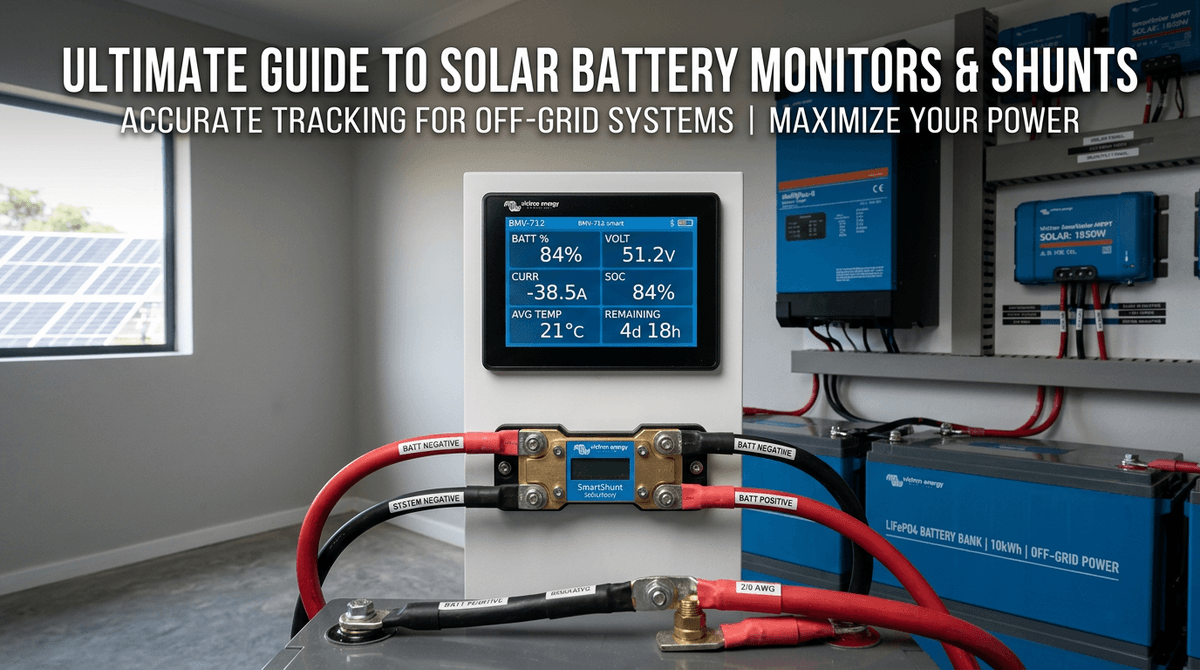
To get an accurate State of Charge (SoC) reading, you need a shunt-based battery monitor.
A shunt is a solid block of metal (usually brass or copper) that is installed directly on the main negative cable coming out of your battery bank. Every single electron that goes into or comes out of the battery must pass through this block of metal.
Because the shunt has a known, precise electrical resistance, the monitor can measure the microscopic voltage drop across the metal block to calculate exactly how many amps are flowing through it.
Think of a shunt like a water flow meter on a pipe. It counts every "gallon" (amp) of electricity that flows out to your appliances, and every "gallon" that flows back in from your solar panels. By doing this math (called Coulomb counting), the monitor can tell you exactly what percentage your battery is at, down to 0.1%.
Key Features to Look for in a Battery Monitor
When shopping for a battery monitor, keep an eye out for these crucial features:
- Amperage Rating: Shunts are rated for a maximum continuous current (e.g., 500A). Make sure the shunt is rated higher than the maximum draw of your inverter. A 500A shunt is standard and plenty for almost any 12V or 24V system.
- Bluetooth Connectivity: Being able to check your battery percentage, current draw, and solar input from an app on your phone is a game-changer.
- Time-Remaining Calculation: The best monitors take your current power draw and calculate exactly how many hours and minutes you have left before the battery dies.
- Programmable Alarms: You want a monitor that can sound an alarm (or trigger a relay to start a generator) if the battery drops below a certain percentage.
The Best Solar Battery Monitors on the Market
Here are our top picks for the best shunt-based battery monitors for off-grid solar systems:
1. The Gold Standard: Victron SmartShunt (500A)
Victron Energy is the undisputed king of off-grid solar monitoring, and the SmartShunt is their flagship product.
Unlike traditional monitors, the SmartShunt does not come with a physical screen. The shunt itself contains a built-in Bluetooth module. You simply install the shunt, download the free VictronConnect app on your phone, and view all your data there.
Pros:
- Incredibly accurate and reliable.
- Integrates seamlessly with other Victron equipment (like MPPT controllers) via Bluetooth networking.
- Clean, hidden installation (no wires to run to a display screen).
- Excellent app interface with historical data tracking.
Cons:
- No physical screen (though you can buy the Victron BMV-712 if you want a physical gauge).
- Premium price point.
2. The Best Budget Option: Renogy 500A Battery Monitor
If you are on a tight budget but still need the accuracy of a shunt, the Renogy 500A Battery Monitor is an excellent choice.
It comes with a physical LCD screen that displays your voltage, current (amps in/out), capacity (Ah), and a battery percentage bar. It is simple, effective, and costs a fraction of the premium brands.
Pros:
- Very affordable.
- Includes a clear, backlit physical display.
- Easy to program and set up.
- Includes a long data cable to mount the screen anywhere in your RV/cabin.
Cons:
- No Bluetooth or smartphone app.
- The display interface looks a bit dated compared to modern apps.
- Does not network with other solar components.
3. The Best All-in-One Display: Victron BMV-712 Smart
If you want the premium quality and Bluetooth app of the Victron SmartShunt, but you also want a physical gauge mounted on your wall, the BMV-712 is the ultimate choice.
It includes a 500A shunt, a beautiful round physical display (that fits in standard 2-inch gauge holes), and built-in Bluetooth. It also includes a programmable relay that can automatically start a generator when your batteries get low.
Pros:
- Both physical display and Bluetooth app.
- Programmable relay for auto-generator start.
- Secondary voltage input (can monitor the voltage of a separate starter battery).
- Top-tier Victron build quality.
Cons:
- The most expensive option on this list.
- Requires running a data wire from the battery bay to the display location.
4. The Rising Star: AiLi 500A Battery Monitor
Similar to the Renogy, the AiLi is a highly popular budget monitor found on Amazon. It is incredibly basic but gets the job done for small DIY builds, van conversions, and weekend warriors.
Pros:
- Extremely cheap.
- Accurate Coulomb counting.
- Simple, no-frills installation.
Cons:
- Flimsy plastic housing.
- Instructions are notoriously difficult to understand (poor translation).
- No smart features or Bluetooth.
How to Install a Battery Shunt Correctly
Installing a shunt is relatively straightforward, but making one mistake will render the monitor completely useless.
The Golden Rule of Shunt Installation: Absolutely nothing can be connected directly to the negative terminal of your battery bank except the shunt.
- Disconnect all negative cables from your battery bank.
- Connect a single, heavy-duty cable from the main negative terminal of your battery bank to the "B- / Battery" side of the shunt.
- Connect all of your system's negative cables (inverter, solar charge controller, 12V fuse block, chassis ground) to the "P- / System" side of the shunt.
- Connect the small positive power wire from the shunt to the positive terminal of the battery (this powers the monitor).
If you accidentally connect a solar negative wire directly to the battery instead of the shunt, the monitor will not "see" that incoming solar power, and your battery percentage will be completely wrong.
Conclusion
Upgrading from a cheap voltage meter to a true shunt-based battery monitor is one of the best investments you can make in your off-grid solar system. It eliminates range anxiety, protects your expensive batteries from over-discharge, and gives you a deep understanding of your daily energy consumption.
If you want the absolute best, buy the Victron SmartShunt. If you are on a strict budget, the Renogy 500A Monitor will serve you perfectly well.
Ready to take your off-grid system to the next level? Don't forget to use our WattSizing Solar Calculator to ensure your solar panels and battery bank are perfectly matched to your energy needs!
Frequently Asked Questions (FAQ)
Do I need a shunt if my lithium battery has Bluetooth?
Many modern "smart" lithium batteries have built-in Bluetooth that shows the State of Charge (SoC). If you only have one battery, this is usually sufficient. However, if you have multiple batteries wired in parallel, the individual battery apps cannot talk to each other to give you a total system percentage. In a multi-battery bank, a dedicated external shunt is highly recommended.
Can a shunt be installed on the positive cable?
No. Standard battery shunts are designed to be installed on the negative side of the circuit. Installing them on the positive side is dangerous, can cause short circuits if the shunt touches a metal chassis, and will likely destroy the monitoring electronics.
Why does my battery monitor say 100% but the voltage is low?
Battery monitors must be "synchronized" when first installed. You must fully charge your batteries to 100% (until the solar controller goes into float mode), and then manually tell the monitor "This is 100%." If the monitor gets out of sync over time, it may incorrectly display 100% when the battery is actually drained. Most high-end monitors (like Victron) will auto-sync themselves every time the battery reaches a full charge.


