
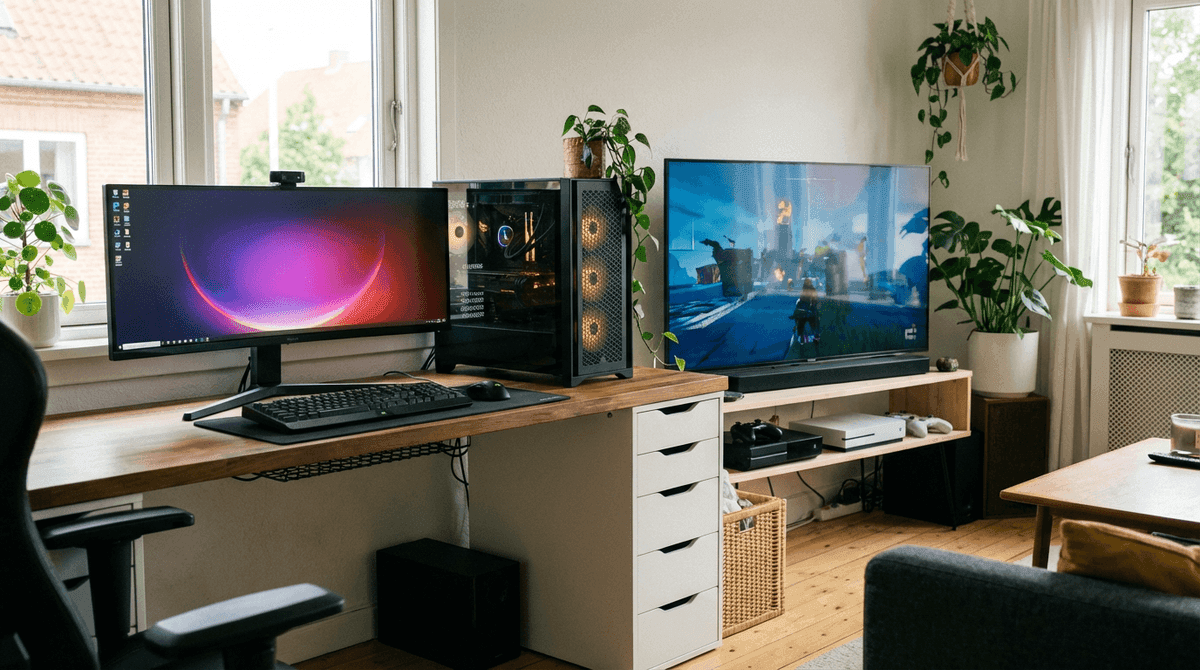
Remote work and home entertainment look modest on a sticker until you stack 24/7 network baseload, a gaming GPU peak, or a room AC compressor start on the same outage circuit. This master guide unifies running watts, surge behavior, and daily kWh for every topic absorbed into the home-office cluster—so inverter, battery, and generator decisions start from one technical page instead of eleven thin duplicates.
Ranges below synthesize existing EN cluster articles, manufacturer nameplates, and plug-meter measurements where available. We separate instantaneous W (breaker and inverter continuous) from kWh/day (battery and solar) because routers and Starlink never sleep while laptops only hit brick maximum part-time. When two loads can peak in the same minute, we size for honest overlap, not a single-device spreadsheet.
| Desktop tower | 100–500 | Low inrush | 0.4–2.5 | Add monitors separately |
| Game console | 50–200 | Low | 0.2–1.0 | Standby still draws |
| Gaming laptop | 150–300+ | — | 0.3–1.2 | GPU-bound peaks |
| Gaming PC + monitors | 300–900+ | PSU inrush | 1–6+ | Size to gaming peak |
| Laptop (office) | 15–100 | — | 0.05–0.4 | AC adapter max is ceiling |
| Router / modem / ONT | 10–40 | — | 0.24–1.0 | 24/7 baseload |
| Starlink dish + router | 25–75 | — | 0.6–1.8 | Snow-melt spikes |
| Television (LED) | 30–150 | — | 0.1–0.8 | Brightness drives W |
Typical ranges for planning — confirm with nameplate labels and your use pattern.
For whole-home off-grid design, see the Off-Grid Solar System Guide 2026. Build a defensible load list with How to Build a Load List for Off-Grid Solar Sizing, then model concurrent peaks in the WattSizing Calculator.
Desktop computer watts and duty cycle
A typical desktop draws 100–500 W at the wall depending on CPU/GPU load, plus 30–80 W per external monitor. Unlike refrigerator compressors, desktops rarely produce multi-kilowatt surges, but power supplies can inrush when the breaker is closed. The off-grid killer is hours online: eight hours at 250 W is 2.0 kWh before displays. A 650 W PSU label is supply capacity, not continuous draw—use a plug meter on your tower for backup math.
Duty cycle for office work is bursty: idle near 80–120 W, spikes during exports or compiles. For inverter sizing, use measured peak during your worst work session, not idle. If the desktop shares a 15 A office circuit with a microwave or portable AC, plan circuit total, not PC alone.
Office workload bands: Light web and documents often sit 80–150 W at the wall; video calls with camera 150–250 W; spreadsheet or IDE compiles 200–400 W. Add 30–80 W per monitor—a dual-monitor finance setup can add 160 W before the tower CPU spikes.
PSU nameplate trap: A 750 W supply does not draw 750 W—it only limits maximum delivery. For battery runtime, log actual Wh over a workday: (average W) × hours ÷ 1000.
Off-grid sizing: A 12 V 300 Ah bank (~3.6 kWh nominal) yields roughly 2.9 kWh usable at 80% DoD—about one 8-hour day at 360 W average, not a full dual-monitor workstation at 600 W steady.
Gaming PC: idle, gaming, and max load
Gaming PCs commonly idle at 60–120 W, draw 200–450 W while gaming, and can exceed 500–850 W on high-end combined CPU/GPU loads. Frame-rate caps materially change GPU watts—uncapped 1440p/4K can add hundreds of watts versus a 60 FPS cap. Always add monitors and peripherals: a 350 W tower plus 50 W display plus 35 W network gear is 435 W at the receptacle.
For generators and inverters, size continuous to your honest gaming peak if outage gaming is required. A 1,500 W inverter can trip when a fridge compressor starts on the same bus even if the PC "only" needs 700 W.
GPU dominates: Mid-range cards often add 150–350 W on top of CPU. Ray tracing and uncapped frame rates can push total draw 200 W higher than a capped 60 FPS profile—use in-game caps during outages to stay inside inverter headroom.
Peripheral stack: Gaming keyboard RGB 5–15 W, monitor 40–120 W, stream capture 15–30 W, network 25–40 W—budget +100–200 W above tower-only estimates.
Surge: ATX supplies can draw brief inrush on cold start; not LRA-class, but a 1,000 W inverter may still complain if a fridge starts simultaneously. Stagger breaker closes.
Laptop power draw and charging brick rule
Office laptops often run 15–30 W on light tasks and 50–100 W under heavy software; gaming laptops 150–300+ W. The AC adapter rating (65 W, 100 W, 140 W) is the hard ceiling from the wall. Laptops do not need surge multipliers for generator math.
ARM-based ultrabooks (Apple Silicon class) can cut daily Wh by 50–80% versus a desktop stack for the same hours—often the best kWh-per-work upgrade on solar-backed offices.
Brick math: A 100 W USB-C brick delivers at most 100 W to the machine—gaming cannot exceed that from the wall. 65 W ultrabooks peak lower; 140–240 W bricks on performance laptops.
Battery bypass: Many laptops pull less from AC when the internal battery is full—logging should use your typical charge state.
DC-native option: Some off-grid offices run 12/24 V DC chargers directly from battery, skipping inverter loss (5–15% saved) when the adapter supports it.
Router, modem, and ONT baseload
Combined modem/router/ONT stacks draw 10–40 W continuously. That is 0.24–1.0 kWh/day—small in watts, large in autonomy because it never sleeps. On 12 V batteries, 25 W × 24 h = 600 Wh/day before inverter efficiency. Treat network gear as priority baseload in solar and battery sizing, not as an afterthought row.
Always-on cost: 25 W × 24 h = 600 Wh/day—on a $0.16/kWh grid about $0.10/day, but on a 400 Wh power station it is more than one full small pack daily just for Wi‑Fi.
ONT vs cable: Fiber ONT + Wi‑Fi often 20–35 W; cable modem + router 25–45 W. ISP-provided combo units are rarely optimized for Wh.
UPS interaction: Consumer UPS on modified sine can make routers reboot every few minutes—pure sine or router on DC is more stable than fighting THD.
Starlink dish watts and snow-melt spikes
Residential Starlink commonly averages 25–75 W with brief higher draws during boot or snow melt. Budget 0.6–1.8 kWh/day for always-on satellite service. Use pure sine inverters—marginal voltage causes reboot loops that mimic outages. Mount and cable losses matter less than uptime Wh on multi-day storms.
Generation 2/3 residential: Plan 40–75 W average; boot and snow-melt can spike 100–150 W briefly. Dish azimuth motors add short pulses during setup.
Voltage sensitivity: Starlink resets on brownout—keep inverter output tight; oversized inverters idling high can waste more Wh than the dish itself.
Data vs power: Heavy download does not multiply watts much; transmit during video upload runs slightly higher—still minor vs 24/7 idle.
Television watts by panel type
Modern LED/LCD TVs use 30–150 W by size and brightness; legacy plasma can exceed 300 W. TV hours drive kWh; backup concern is concurrency with desktop and router on one limited inverter. HDR at high backlight can push toward the top of the band even on efficient panels.
Size scaling: 32″ LED often 30–50 W; 55″ 60–120 W; 75″ 100–150 W with HDR at max backlight. OLED can be lower on dark content, higher on full-white test patterns.
Standby: 0.5–3 W with quick-start enabled; disable instant-on for off-grid baseload.
Soundbar add-on: 20–80 W wireless soundbars are easy to forget in generator stacks.
Laptop vs desktop: kWh per workday
Eight hours at 25 W laptop ≈ 0.2 kWh; eight hours at 300 W desktop stack ≈ 2.4 kWh—often an order-of-magnitude difference for batteries. Desktops win on peak performance and repairability; laptops win on Wh per deliverable work for off-grid offices. Hybrid setups (laptop docked with external monitors) land between the bands—measure yours.
Worked comparison: 8 h × 25 W laptop = 0.20 kWh; 8 h × 280 W desktop + 80 W dual monitors = 2.88 kWh—14× energy for the same clock hours.
Docked laptop hybrid: Docked ultrabook with one 27″ monitor often 35–80 W light use, 120–180 W heavy—middle path for solar offices.
Embodied energy: Desktops are not an electrical topic, but longer hardware cycles can justify higher Wh where grid is stable.
PC vs game console on backup power
Consoles often draw 50–200 W gaming versus 300–900 W on high-end PCs. Generator classes of 1,500–2,500 W can cover console plus network unless room AC shares the circuit. Console standby can still be 10–20 W—include it in baseload.
PlayStation/Xbox class: Gaming 120–200 W, idle 40–70 W, download 50–90 W. Nintendo Switch on dock 15–40 W—far below PC.
Upside for backup: Console + TV + router 250–400 W gaming is realistic on 1,800 W inverters if no AC on the same leg.
Downside: Consoles lack work-productivity role—office outages still need PCs for many households.
Generator sizing for home office setups
Laptop + network + lights: often 1,000–1,800 W class. Desktop + dual monitors + network: 1,800–2,800 W. Any room AC or mini-split in the office zone: 2,500–4,500 W+ because compressor LRA dominates. Prefer inverter generators for electronics THD. Stagger laser-printer warm-up and AC starts when running near nameplate.
Tiered generator map: Tier A (comms only): router + laptop + LED ~100 W → 1,000 W gen with surge for fridge. Tier B (work): desktop stack 600–900 W → 2,000–2,800 W. Tier C (comfort): add room AC +900–1,500 W running → 3,500 W+.
Transfer switch: Power only the office subpanel if the main panel cannot feed whole-home AC and kitchen simultaneously.
Fuel planning: 0.9 kWh workday at $0.16 is $0.14 grid power—but 1 gal gasoline at 3,500 W for 4 h is a different budget line entirely.
Homelab racks and NAS peaks
Racks with switches, NAS, and UPS charging add 200–800 W steady; disk spin-up adds short peaks. Sum nameplates honestly unless you have measured diversity data. A 20 A dedicated circuit is common for good reason when multiple switch-mode supplies start together.
NAS spin-up: 4–8 bay NAS with WD Red drives can jump 80–150 W on spin-up from 40 W idle—schedule parity checks outside backup hours.
PoE switches: 15.4 W × ports adds up—a 24-port PoE switch can be 150–400 W with many cameras powered.
UPS charging: Rack UPS recharging after outage can add 200–600 W for hours—hidden load on small generators.
Starlink on off-grid solar
Budget 600–1,800 Wh/day for Starlink before computing loads—often larger than a fridge in Wh because it does not cycle off. On 12 V, that is 50–150 Ah/day before depth-of-discharge and inverter loss. Pair with the Off-Grid Solar System Guide 2026 when Starlink is the anchor load for a remote site.
Solar array sketch: 1.2 kWh/day Starlink load ÷ 4 peak sun hours ≈ 300 W panel nameplate minimum before losses—in practice 400–600 W module count with MPPT and 90% battery round-trip.
Ah math at 12 V: 1,200 Wh ÷ 12 V ÷ 0.85 efficiency ≈ 118 Ah/day consumed from battery—two 100 Ah lithium banks rotate if sun is poor.
Hybrid grid: Grid-tied with outage: Starlink on UPS separate from window AC prevents reboot loops.
Inverter and battery notes for mixed office loads
Pure sine inverters in the 1,500–3,000 W class are the common bridge for home offices on battery backup. Size continuous to the sum of steady loads after inverter efficiency (~90% typical), and verify surge if any motor loads share the bus. Phantom loads matter: leaving a 2,000 W inverter powered 24/7 can consume 20–40 W idle—comparable to a router for a full day. Power the inverter off when the office is unused unless you need always-on network on a separate DC path.
Lithium banks at 12 V need honest C-rate math: 760 W at 12 V is ~63 A before efficiency—many small batteries cannot sustain that without voltage sag that reboots electronics. 24 V or 48 V systems reduce current stress for the same office stack.
Idle loss: A 2,000 W inverter idling 25 W costs 600 Wh/day—same order as Starlink. Turn inverter off overnight if network can drop.
Harmonics: Cheap MSW inverters heat laptop chargers; pure sine reduces wasted Wh and failed electronics.
48 V advantage: 900 W office at 48 V is ~19 A vs ~75 A at 12 V—less voltage sag on the same cable size.
Off-grid sequencing discipline
On limited backup, start AC last after computers and network are stable. Disable automatic Windows updates and cloud sync during outages—they spike CPU and disk watts unpredictably. For satellite offices, consider a DC router on the battery side and only invert the workstation—cuts daily Wh materially on small cabins.
Startup order: (1) inverter on, (2) router/ONT, (3) computer, (4) monitors, (5) optional printer, (6) last portable AC or space heater. Reversing order causes reboots and GFCI trips.
Software: Pause OS updates, cloud sync, and crypto tabs during outages—CPU spikes are unpredictable +100–300 W.
Printer: Laser printers 400–900 W warm-up for 30–90 s—do not print while running near inverter limit.
Worked example: storm-day home office
Steady stack: desktop 520 W + two monitors 140 W + network 40 W + LED lights 60 W = 760 W.
Added load: 6,000 BTU portable AC ~900 W running; compressor start 1,800–2,200 W for 1–3 s.
Generator: 2,200 W running / 2,800 W peak units trip when AC starts under full office load. Practical: 3,500–4,500 W class or staggered AC start.
Battery (4 h at reduced 200 W laptop mode): (200 × 4) ÷ 0.9 ≈ 0.89 kWh usable before depth-of-discharge rules—not enough for the desktop stack above without a larger bank.
FAQs
Do laptops need surge multiplier on generators?
Generally no—size to the AC adapter maximum plus concurrent loads.
Is Starlink heavier than a fridge in kWh?
Often yes because it runs 24/7 while fridges cycle off.
Can a 2,000 W generator run a gaming PC?
Maybe alone; add fridge, AC, or printer peaks and upsize.
Why does my UPS click on generator power?
Frequency or THD—prefer inverter generators or double-conversion UPS.
Desktop vs laptop for off-grid solar?
Laptops usually win daily kWh; desktops win peak performance.
How do I measure real desktop draw?
Use a plug meter for 24 h—PSU labels are not continuous draw.
Does a TV matter for backup?
Only when concurrent with high office loads on one inverter.
What sine wave for electronics?
Pure sine is safest for chargers, NAS, and mixed loads.
Should routers run on DC?
12 V routers skip inverter loss—worth it when every Wh counts.
Can I run Starlink on a power station?
Yes if continuous W and daily Wh fit; budget snow-melt headroom.


